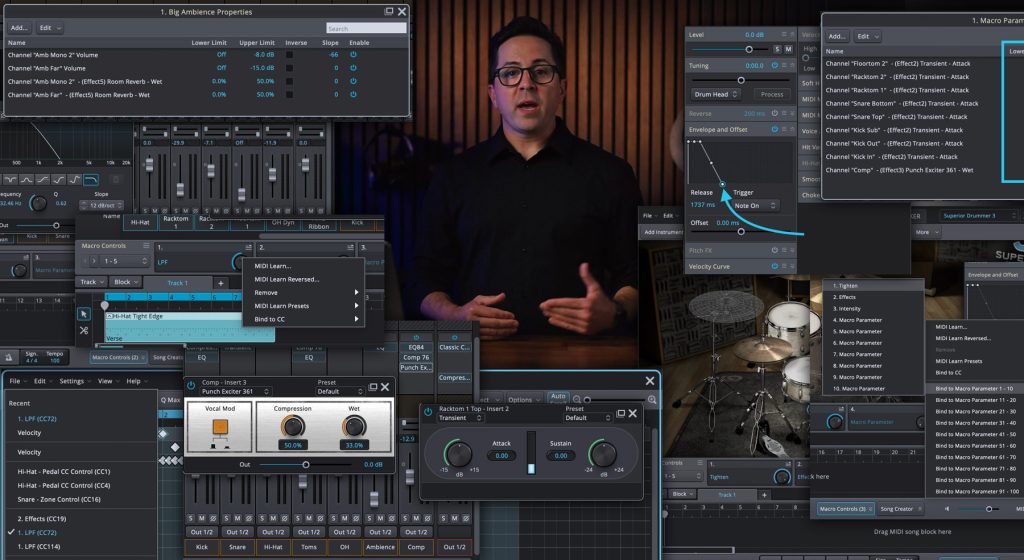
The principles behind programming a convincing drum track all come from understanding how a real drummer plays. How they distribute power across hits, how they move between limbs, where they leave space and where they embellish. Every section of this guide is rooted in that physical reality. The fundamentals apply equally to EZdrummer 3 and Superior Drummer 3, and where something is exclusive to one program, I’ll point it out as we go.
Starting with the kick drum
The kick is the foundation. It tells the listener where the downbeat is and anchors the low end of the track. The remaining kit pieces have nothing to anchor to if the kick is not locked in place.
Basic placement
To understand how moving kicks change the foundation of the song I recommend setting up the grid editor of EZdrummer 3 or Superior Drummer 3 like a step sequencer. Simply loop 2 bars in the song track by enabling looping and selecting the first 2 bars, then turn on the metronome and press play. Using the pencil tool to draw in kick hits while the metronome is playing will instantly help you understand the foundation of the groove you have in your head.
Most rock and pop grooves start the same way: kick on 1 and 3, snare on 2 and 4. Everything else is variation. Add a kick on the “and” of 2 and you get forward motion into beat 3. Move it to the “e” of 4 and you set up the downbeat of the next bar.
The most common kick pattern in pop music is “four on the floor,” which is just a kick hit on every quarter note. That’s the backbone of house, techno, disco and a huge chunk of pop.
When you start adding syncopated hits, think about the gaps in the pattern. Where could a real drummer fit a kick that adds motion without crowding the snare? That’s where syncopation lives. These aren’t decorative choices. They shape how the listener feels time.
Now try deleting all snare hits and experiment with the placement of the kicks, moving them outside the standard 1 and 3 positions. Notice how the kick interacts with the metronome and creates something interesting.
Congratulations, you’re now an electronic music producer.
The relationship between kick and bass
Kick and bass live in the same frequency range, and the way they interact defines the low end of the entire track. In most styles, kick and bass are aligned on the downbeat: when the kick hits, the bass hits. That’s where the punch comes from.
From there, things can get more conversational. The bass might hold a note through a kick hit. The kick might drop out where the bass is moving. Funk and soul lock the two together rhythmically without ever mirroring each other, which is part of why the low end on those records always feels alive.
When you’re programming a kick, listen to the bass line you’re writing against and make deliberate decisions about where they line up and where they don’t. The Toontrack MIDI library includes professionally performed kick and bass patterns, and browsing them together is one of the fastest ways to internalize how the two instruments interact across genres.
The most common velocity mistake
Velocity is where a kick track lives or dies.
The temptation is to set every hit to 127 because the kick is the hardest hitting instrument in the kit. Don’t. A kick at full velocity on every note produces a track with no variation, no dynamics and no sense that anyone is actually playing it. Real drummers don’t hit that way.
A kick on the downbeat of bar 1 isn’t the same intensity as a syncopated kick on the “and” of beat 2. The downbeat is grounded and heavy. The syncopation has more lean to it, often a little softer, serving the forward motion of the phrase rather than anchoring it.
A practical starting point is to think in two tiers. Primary hits, the downbeats and beat 3 in a standard rock groove, sit somewhere between 100 and 115. Syncopated and secondary hits sit between 75 and 95. From there, nudge individual hits up or down by five to ten depending on where they fall in the bar. Even small differences between adjacent hits give the pattern a sense of being played.
In both EZdrummer 3 and Superior Drummer 3 the velocity lane in the grid editor makes this easy. Open it, click into individual notes, make the adjustments. The difference is immediately audible.
Finding kick patterns in the Toontrack MIDI library
Before programming a kick from scratch, search the grooves tab first. Toontrack’s MIDI library and add-on MIDI packs include kick patterns recorded by professional drummers across nearly every style and tempo, from straight rock to syncopated funk to programmed-style four-on-the-floor.
Filter the grooves tab by tempo and style to narrow things down, then audition the patterns against your track. When you find one that fits, copy the groove, paste it onto the song track and use the paste options to extract just the kick. From there you can combine that kick with another groove’s snare or hi-hat by dragging additional MIDI into the same region in the grid editor. The MIDI merges into a single file.
Enabling Show Webshop MIDI in the grooves tab opens the search up to every kick pattern across Toontrack’s full catalog of available MIDI packs.
Kick articulations
This is where the two programs differ. EZdrummer 3 has a single kick articulation, so all your dynamic variation comes from velocity and the natural variation between sample layers.
Superior Drummer 3 has two: Hit and Open. Hit is when the beater stays buried against the head after striking, which produces a tighter, more controlled tone with less sustain. Open is when the beater is allowed to bounce off the head, producing a fuller, more resonant sound with more low-end body.
In SD3, switching between Hit and Open across different positions in a pattern adds another layer of variation that responds the way a real kick does. Primary hits could use Open for a fuller sound while syncopated hits use Hit for a tighter, more articulate feel. Or the opposite. It depends on the style.
Programming the snare
The snare is the backbeat of the groove. It defines beats 2 and 4 in most patterns, punctuates fills and adds texture through ghost notes. Get it wrong and listeners feel it before they hear it.
Building the kick and snare pattern
Before you draw anything in, try this: tap the beat out on a table while listening to your track with a metronome. Take it one section at a time. The kick and snare are the rhythmic skeleton of every groove, and getting them locked in before adding cymbals or fills will keep the rest of the kit from drifting away from what the song actually wants.
It sounds basic. It works.
Snare fundamentals
In a standard groove the snare sits on beats 2 and 4. That’s the backbeat, and it’s the pulse listeners physically feel. Tap your foot to almost any pop or rock record and you’re tapping along with the snare.
Articulations are where it gets interesting. EZdrummer 3 includes five snare articulations: center, rimshot, edge, side stick and rim only. Superior Drummer 3 has all of those plus an off-center articulation. Each one has a specific role.
The center hit is the standard articulation. It’s the full, open sound of a stick striking the head near the middle, and it’s the default for most backbeat hits at moderate velocity.
The rimshot isn’t a trick or an effect. It’s what a real drummer plays when they want a snare hit to cut through everything in the mix. The stick strikes the head and the rim at the same time, and the result is the loudest, most authoritative sound the drum can produce. Use it for the hardest accented backbeats and nothing else. The contrast is what makes it powerful, and using a rimshot on every hit kills the contrast.
The edge articulation is a softer, drier tone struck closer to the rim. It works for lighter accents that need a different color than the center hit.
The side stick is the click sound a drummer gets by laying the stick flat across the drum and tapping the rim with the shoulder of the stick. Most common in ballads and sparse arrangements where a full backbeat would be too aggressive.
The rim only articulation hits the metal rim of the drum without engaging the head. Brighter, more percussive, used sparingly.
In SD3, the off-center articulation is a slightly drier, more controlled version of the center hit. It’s particularly useful for ghost notes, where consistency and restraint matter more than volume.
Snare velocity and dynamics
The same principle applies as the kick. Uniform velocity sounds like a machine. Backbeats shouldn’t all sit at the same value, even when they’re all playing the same role in the pattern.
Bar 1 and bar 3 of a four-bar phrase often feel a little different. A drummer naturally pushes the snare in bar 4 to signal the return of bar 1. Those micro-variations happen instinctively in a live performance.
A practical approach: set primary backbeats between 100 and 120, then nudge individual hits up or down by five to ten depending on where they sit in the phrase. The hardest hits, usually at the end of a phrase or leading into a new section, are your rimshots at or near maximum velocity. Everything else breathes below that ceiling.
Finding snare patterns in the Toontrack MIDI library
Same approach as the kick. The grooves tab is often the fastest path to a snare pattern that already feels like a real performance. Toontrack’s MIDI library and MIDI packs include patterns from drummers playing across every style, tempo and feel, with subtle velocity variations and ghost note placements that take serious time to program by hand.
Solo the snare in the mixer to evaluate a pattern in isolation without the rest of the kit competing for your attention. When you find a feel you like, copy the groove, paste it to the song track and use the paste options to extract just the snare. Merge it with your existing kick, hi-hat or whatever else you’ve built using the grid editor.
Show Webshop MIDI broadens the search to every Toontrack MIDI pack available, which is particularly useful when you’re after a genre-specific snare feel: brushed jazz patterns, motown shuffles, syncopated funk and so on.
Adding ghost notes
Ghost notes are what separate a programmed groove from a performed one. They’re very low velocity snare hits, almost felt rather than heard, that fill in the underlying 16th-note pulse of the groove. Done right, they give a beat continuous motion and make the kit feel like one drummer playing a part instead of separate pieces stacked on top of each other.
Where to place ghost notes
In a standard groove with snare on 2 and 4, kick on 1 and 3 and hi-hat playing 8th notes, the ghost notes live in the gaps between everything else. Set your grid to 16th notes and look at where there’s space. Those spaces are the candidates.
Two positions need extra care. The 16th note directly before a snare backbeat is technically very difficult to play because the left hand has to transition from a barely audible ghost note to a full, heavy backbeat in a single subdivision. On a real kit it’s nearly impossible at faster tempos. You can program it at slower tempos but use it sparingly.
The 16th note directly after the backbeat is just as challenging because it follows a hard hit and demands excellent left-hand technique. We aren’t bound by physical limits in MIDI, but using this 16th note in every single bar starts to sound unnatural. Add it occasionally, not as a rule.
Real drummers play ghost notes with singles or doubles: one hit, or two consecutive hits with the same hand. Programming three or more consecutive ghost notes in a row moves outside what a left hand can comfortably do, and the realism suffers. Stick to single ghost notes or pairs.
32nd notes
Ghost notes don’t have to live exclusively on the 16th-note grid. At slower tempos, 32nd-note ghost notes can add a more nuanced feel, particularly in the position directly before the downbeat of a new bar. Switch the grid resolution to 32nd notes, zoom in and place the note. You can also turn off grid snapping and move the note slightly off the grid for a more organic placement.
Velocity and articulations
When adding ghost notes, velocity is everything. Ghost notes should sit low, somewhere between 20 and 45 depending on the drum and the mix preset you’re using. Any higher and they become audible as regular hits, which defeats the purpose. In both EZdrummer 3 and Superior Drummer 3 the program adds new notes at the most recently set velocity, so set one ghost note at the right level, adjust it, and the rest will follow.
To fine-tune a whole group, open the velocity lane in the grid editor, lasso the low-velocity notes and adjust them together. If your mix preset includes heavy compression the ghost notes will respond differently than they would on a more open, natural preset. I’d recommend establishing the right level on a preset with less processing first, then adjusting for compressed mixes.
For articulations, the center hit is the standard choice for ghost notes. In EZdrummer 3 you can experiment with the edge articulation. In SD3 the off-center articulation is worth trying. Results vary significantly between drum kits. Some edges sound so different from the center that the ghost note becomes distracting. Let your ears decide.
One more thing: when ghost notes are present in a groove, the accented backbeats are almost always rimshots. The contrast between a barely audible ghost note and a full rimshot is one of the defining sounds of the technique.
Programming the hi-hat
The hi-hat is the most difficult instrument in the kit to program convincingly. It’s also the one that gets the least attention, because on the surface it looks simple. A repeating pattern of closed and open hits sitting on top of the groove. The reality is more complicated.
Using the Toontrack MIDI library
The fastest path to a convincing hi-hat is to use one that was already played by a real drummer. EZdrummer 3 and Superior Drummer 3 both ship with extensive MIDI libraries, and Toontrack’s catalog of MIDI packs covers virtually every style and tempo. These files were recorded by professional drummers on electronic kits, which means every articulation, velocity variation and timing nuance is already baked in.
Before you try to program a hi-hat from scratch, spend time in the grooves tab. Think about the pattern you want before you search. Is it quarter notes? 8th? 16th? Straight or swung? Tap it out on a table first to clarify what you’re after. Then filter the grooves tab by resolution. The filter is hidden by default; right-click to unhide it.
Solo the hi-hat in the mixer so you can evaluate the pattern without the rest of the kit competing for your attention. When you find a groove you like, copy it, paste it onto the song track and use the paste options to extract only the hi-hat. From there you can combine it with any other groove or pattern you’ve built by opening the grid editor and dragging the MIDI to merge.
If the pattern you want isn’t in your current library, enable Show Webshop MIDI to search every matching file across Toontrack’s full catalog. Searchable, sortable and browsable without leaving the software.
Programming hi-hat patterns from scratch
If you’re programming manually, the first principle is to think in terms of accents. Every hi-hat pattern has a hierarchy of hits, and replicating that hierarchy is what makes a pattern feel played rather than drawn.
For a standard 8th-note pattern the count is “1 and 2 and 3 and 4.” Downbeats, the numbers, are typically accented and played as edge hits. Upbeats, the “ands,” are unaccented and played as tip hits. In both EZdrummer 3 and SD3, draw in the 8th notes, then use the select options in the grid editor to select quarter notes only. Move those to the edge articulation. Invert the selection to grab the upbeats and move those to the closed tip articulation.
For 16th notes the count is “1 e and a.” Both hands are now in play. The right hand covers the 1 and the “and.” The left covers the “e” and the “a.” Right-hand hits carry the same accented edge pattern as the 8th-note example. Left-hand hits are lighter and less accented. Applying appropriate velocity to each group is what brings this pattern to life.
Programming a hi-hat swell
Hi-hat swells from closed to open are one of the more involved techniques to program. The full walkthrough, including CC4, the Edge Trigger articulation, smoothing and the Envelope and Offset property box in Superior Drummer 3, is in the embedded video at the top of this section.
Programming the ride cymbal
The ride serves the same function in a groove as the hi-hat. It’s the ostinato, the repeating pattern that ties the kick and snare together and gives the groove its forward motion. Where the hi-hat is closed and cutting, the ride is bigger, washier and more sustaining. The articulations are different and those differences shape how the instrument is used.
Understanding ride articulations
In Superior Drummer 3’s core library, the ride includes bow tip, bow shank, bell tip, bell shank, edge, mute hit and crescendo. EZdrummer 3 has bow tip, bell, edge and a muted hit.
In a standard ride pattern, unaccented hits use the bow tip: the stick striking the flat surface of the cymbal near the middle. Accented hits use the bow shank in SD3, which is the heavier stick-body strike for a fuller, slightly more aggressive tone. In EZdrummer 3, the bow tip handles the light hits and the edge takes the accents.
The bell and bell shank articulations in SD3 give you a different sound character entirely. Brighter, more cutting, more defined. They aren’t a louder version of the bow. They’re a different color. A ride pattern played entirely on the bell has a totally different feel than a bow pattern, and both are valid choices depending on the song.
The edge articulation is essentially crashing the ride. Because a ride is a heavy, large cymbal it doesn’t crash explosively the way a thin crash would. It produces a very full, washy sound with a long sustain. It’s the most accented articulation available on the ride and should be used at musical peaks rather than as a rhythmic element.
Ride patterns
Any groove has three rhythmic functions: the downbeat, the backbeat and the ostinato. The kick covers the downbeat. The snare covers the backbeat. The ride provides the ostinato that connects the two.
Any hi-hat pattern translates directly to the ride because both instruments are driven by the same motion of the right hand. If you have a hi-hat ostinato you like, try moving those notes to the ride and selecting appropriate articulations. The character of the groove will change because the instrument sounds different, but the rhythmic relationship to the kick and snare stays intact.
If you’re building a ride pattern from scratch, start with where you want the accents. Quarter-note accents give the groove a driving, regular feel. Off-beat accents create a counter-rhythm that sits very differently in the mix. Both are valid and both are common across different styles, and EZdrummer 3 and SD3 give you the articulation tools to express either approach clearly.
If a complex syncopated ostinato is too tedious to draw in, recording a ride pattern with a MIDI controller over an existing kick and snare is often faster. Don’t worry about articulations during the take. Focus on rhythm and feel. You can edit the articulations afterward by selecting groups of notes and dragging them to the row you want.
For more inspiration, the grooves tab has a Power Hand filter that lets you sort grooves by ride cymbal patterns specifically. These are professionally performed ride parts captured by real drummers, and you can use them directly in your project or just study them to see how working drummers approach the instrument.
Layer limits, smoothing and cymbal swells
Two controls in both programs significantly affect how the ride responds to repeated hits: layer limits and smoothing.
Layer limits control how many velocity layers are available for a given articulation. EZdrummer 3 sets these to a default that works well in most situations. SD3 lets you adjust them. Command-clicking the layer limit number sets it to unlimited, which means every available sample for that articulation gets used. For detailed, nuanced programming, unlimited layers give the most realistic response. Be aware it increases RAM usage.
Smoothing reduces the prominence of consecutive hits compared to single hits. On a physical cymbal, each new strike hits a surface that’s still vibrating from the previous one, which slightly softens the attack. Smoothing simulates that effect, and it’s particularly useful when programming cymbal swells.
To program a ride swell, draw in 16th or 32nd notes depending on the tempo and apply a velocity slope using the slope controls in the velocity editor to create a smooth, even increase across the phrase. End the swell on an edge articulation crash for a strong final accent. Increase smoothing during the swell, particularly in SD3 where the parameter is user-controllable. If your library includes brushes or mallets, both offer a different swell character that’s worth exploring for the right track.
The exact velocity curves and smoothing values that work best will vary from one ride to another, and that’s not a problem. It’s the same as working with real cymbals. Each physical instrument has its own weight, thickness and harmonic character, and those qualities are preserved in the recorded samples. The same is true for hi-hats, snares and every other element in the kit. Adjust to the instrument you’re using rather than expecting one set of values to work universally.
Programming toms
Toms are most often associated with fills, and that’s a perfectly valid starting point. But limiting toms to fills only leaves a lot of rhythmic texture on the table. Toms as groove elements have a long history in rock, Afrobeat and modern pop production, and EZdrummer 3 and SD3 both make it easy to explore both applications.
Using fills from the grooves library
The fastest way to add toms to a track is to pull a professionally performed fill straight from the grooves library and drop it on the song track. Toontrack’s MIDI packs include fills performed by real drummers across a wide range of styles, tempos and time signatures. Browse the fills section of the grooves tab, filter by the tempo or style you need and audition them against your track.
When you find one that fits, drag the entire fill onto the song track. Then look at the leading instrument in the bar before the fill, the hi-hat or ride that’s been carrying the groove, and edit the final beat or two of that pattern so the transition into the fill flows naturally. A fill that arrives without any wind-up from the cymbal pattern can feel abrupt. A small adjustment to the lead-in is usually enough to make the fill connect cleanly to the surrounding groove.
Toms as groove elements
When toms appear inside a groove rather than as transitional fills, they bring a propulsive quality that pure cymbal-driven grooves can’t replicate. Programming this kind of groove follows the same principles as kick programming. Decide which toms are doing downbeat duty and which are providing counter-rhythmic motion. Build the pattern. Apply appropriate velocity. Primary hits should be heavier. Decorative hits should sit lower in the dynamic range.
Edit Play Style and the Power Hand flag
This is one of the most powerful and underused features in EZdrummer 3 and Superior Drummer 3 for creating tom-based grooves quickly.
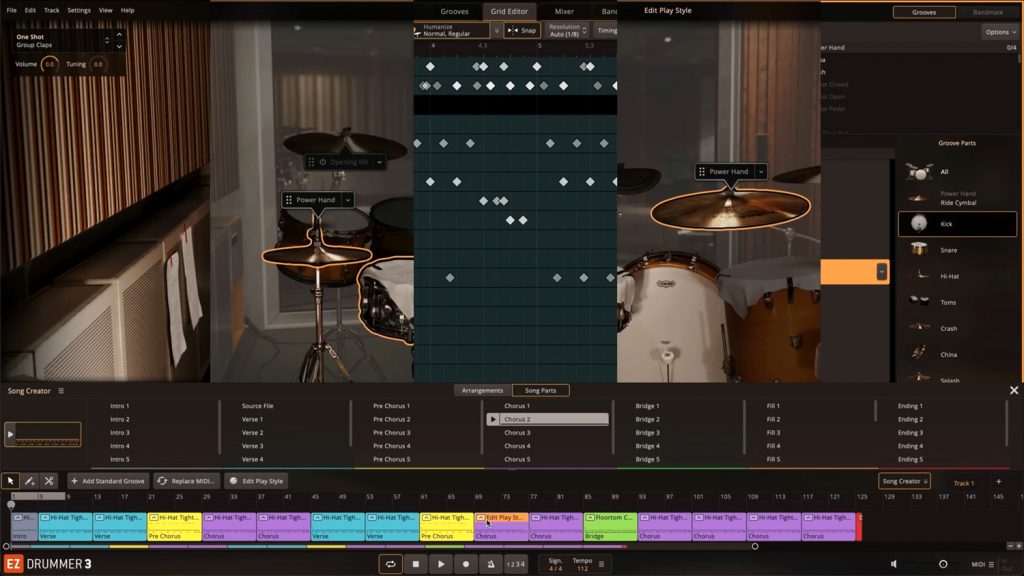
Edit Play Style lets you take any existing groove and reassign the instrument the power hand is mapped to. The power hand is the right-hand ostinato, and reassigning it means a hi-hat groove, a ride groove or any other pattern where the right hand is carrying a repeating ostinato can be instantly converted into a tom groove. The rhythmic structure stays. The velocity variations stay. The timing and the feel stay. Only the instrument changes.
Open Edit Play Style for the groove you want to edit. Select the power hand flag and drag it to a tom as the target instrument. Now the groove is driving the floor tom, the rack tom or whatever drum you’ve assigned it to.
The same filter logic applies when browsing for source material. In the grooves tab, use the Power Hand filter to find grooves performed with a specific instrument as the ostinato. Find one you like, then use Edit Play Style to redirect that ostinato to a tom without rebuilding the pattern. What would otherwise be a time-consuming programming task collapses into a matter of seconds.
Putting it all together
Programming drums that sound convincing is less about any single technique and more about a way of approaching every element. How would a real drummer play this part?
The kick is the foundation and the velocity should vary (i.e. not all notes at 127). The snare defines the backbeat, with rimshots reserved for the hardest hits and ghost notes filling in the 16th-note pulse below them. The hi-hat and ride carry the groove forward with a clear hierarchy of articulations and velocities that mirrors how a drummer’s hands actually move. Toms punctuate, fill and in some styles they create groove, and tools like Edit Play Style let you build those parts from professionally performed source material rather than from scratch.
EZdrummer 3 and Superior Drummer 3 are built around this reality. The MIDI library, the articulations, the groove filters, the property boxes in SD3 and the editing tools in both programs all exist to give programmers the same expressive range a drummer has sitting behind the kit. For another take on programming drums check out Jay Postone’s video on the subject below.





In this article, we dive into how EZkeys 2 can serve as a co-writer rather than just a piano plugin. We’ve highlighted five features that keep you moving forward and help you explore grooves, chords and performances so you can focus on writing and finishing more songs, faster.