 wikwox
Just up graded to windows 8 with an older version of Sonar ( Home Studio 4 XL ) and a 5 or 6 year old version of EZ Drummer. With XP at 32 bit there were no problems, now Sonar will not recognize EZ Drummer. I’ve downloaded the latest driver version to no avail. Any ideas? I’m sure the fix is simple.
 John
JohnHi,
though installing the latest (currently EZdrummer 1.3.2) version of EZdrummer available in your Toontrack account will solve some stuff, the fact that you’re using a seriously outdated host (DAW) will still be the biggest problem.
Even Sonar Home Studio 7 XL is discontinued and AFAIK not Windows 8 compatible.
Best Regards,
John
John Rammelt - Toontrack
Technical Advisor
 Trever MacPherson
I have a similar problem, except that I am using the latest version of EZDrummer and Sonar X2.
In my case, the Soft Synth loads up, I get the EZDrummer GUI, can even select the kits I have purchased. What I see though is 0MB loaded. I get no sound at all. EZDrummer works fine with Toon Tracks Solo 64, so I have to think it is some combination.
My setup is a Behringer Xenyx1204FX with USB UCA200 in. I can hear recorded wave files through the monitors on the Behringer (USB out to channel 7/8), but not the drums I am laying down.
In addition, I am using Windows 8 x64, Sonar X2 x64 but the Soft Synth comes up as ezdrummer (32-bit)
Thanks

Trever MacPhersonFound out one part of the fix. I needed to rescan my VST folder. Make sure that C:Program FilesVstPluginsToontrack is in the VST folder and rescan. That will provide the 64-bit version. I still have no sound, but at least the soft synth is loading (see memory being utilized in EZDrummer) and that’s a start.
John Your screen shot shows 1.3.1 but it should be 1.3.2.
Have not run the 1.3.2 update? Only the 1.3.2 64-bit?
BR,
John
John Rammelt - Toontrack
Technical Advisor
Trever MacPhersonNow that I loaded the proper 64-bit VST, it loads properly, but when I drag a sequence in, it still doesn’t have any sound.

 Rogue
Roguewhere are you dragging the sequence to? We do not have enough information to know what you are doing wrong… depending on the options you select in the ‘Soft synth Options’ dialog then there could indeed be no sound at all, if not properly routed in Sonar.
Rogue Marechal - Toontrack
Configuration Manager
Trever MacPhersonI suspect the problem is with my lack of knowledge around setting up a DAW.
This screencap might help out. Probably this is a Sonar question more than a Toontracks one. I have done multiple searches, but so far no luck!
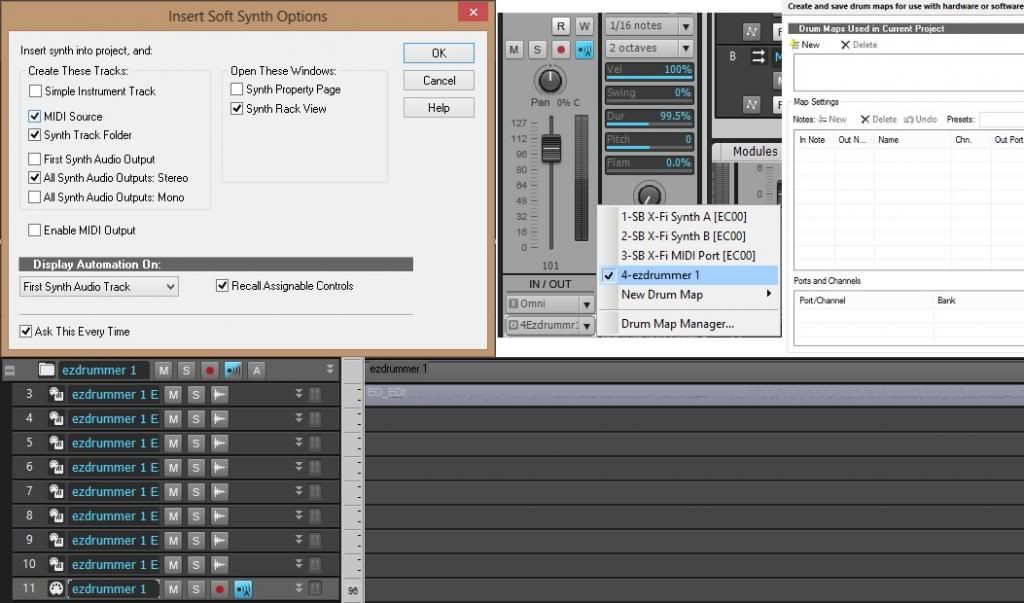
Roguethe track you should drag the MIDI to is the last one down… check this https://www.toontrack.com/support_portal.asp?prod=EZdrummer%20and%20EZX%20expansions&issue=Operation&ID=805 that may clarify certain aspects.
Rogue Marechal - Toontrack
Configuration Manager
Trever MacPhersonAha
I think I have it! Messing around enough and something good may happen.
Here is what I did when I selected the soft synth.
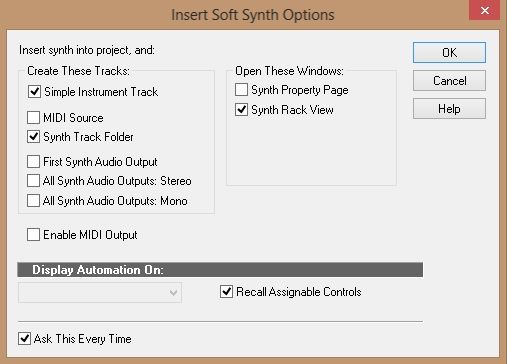
RogueI’m not a Sonar expert, but I’m guessing this is a ‘custom view’… this won’t give you separate outputs however, which from your screenshot I had assume you wanted. Or maybe it will (I don’t have Sonar here to check).
Rogue Marechal - Toontrack
Configuration Manager
Trever MacPhersonYou’re right, I don’t have multiple outputs, which I need to have. Still messing around with this, but it is definitely not a Toontracks issue, but a Sonar one. If I stumble on the answer, I will post it here so that others can benefit.
One question is about Mapping, I am not sure how this is done – but again, that’s a Sonar question, but if anyone has done the mapping for DFH and Metal Machine, that might be helpful.
ScottHere’s a video from the Support Portal FAQ on how to set up multi outputs in Sonar
http://www.toontrack.com/helpdesk/issue_view_portal.asp?ID=805
Scott Sibley - Toontrack
Technical Advisor
Trever MacPhersonI have to send out a huge thanks! Despite this being clearly a user knowledge problem, and with Sonar, the support has been phenomenal!
Missed the deal?
Don’t forget to select
your free product!
The free product is included with
your purchase.
Your cart is empty.

Get all the latest on new releases,
updates and offers directly to your inbox.
Note: By clicking the 'I WANT IN' button, you will not be creating a Toontrack user account. You will only sign up to get our newsletters, offers and promotions to your inbox. You can unsubscribe at any time from a link at the bottom of each email. If you want to learn more about our privacy policy, please find detailed information here.
